
Event fields reference
The event form is generated from the calendar’s own field set, so labels and order can differ from the defaults below. The twelve built-in fields are always present and can never be removed or retyped.
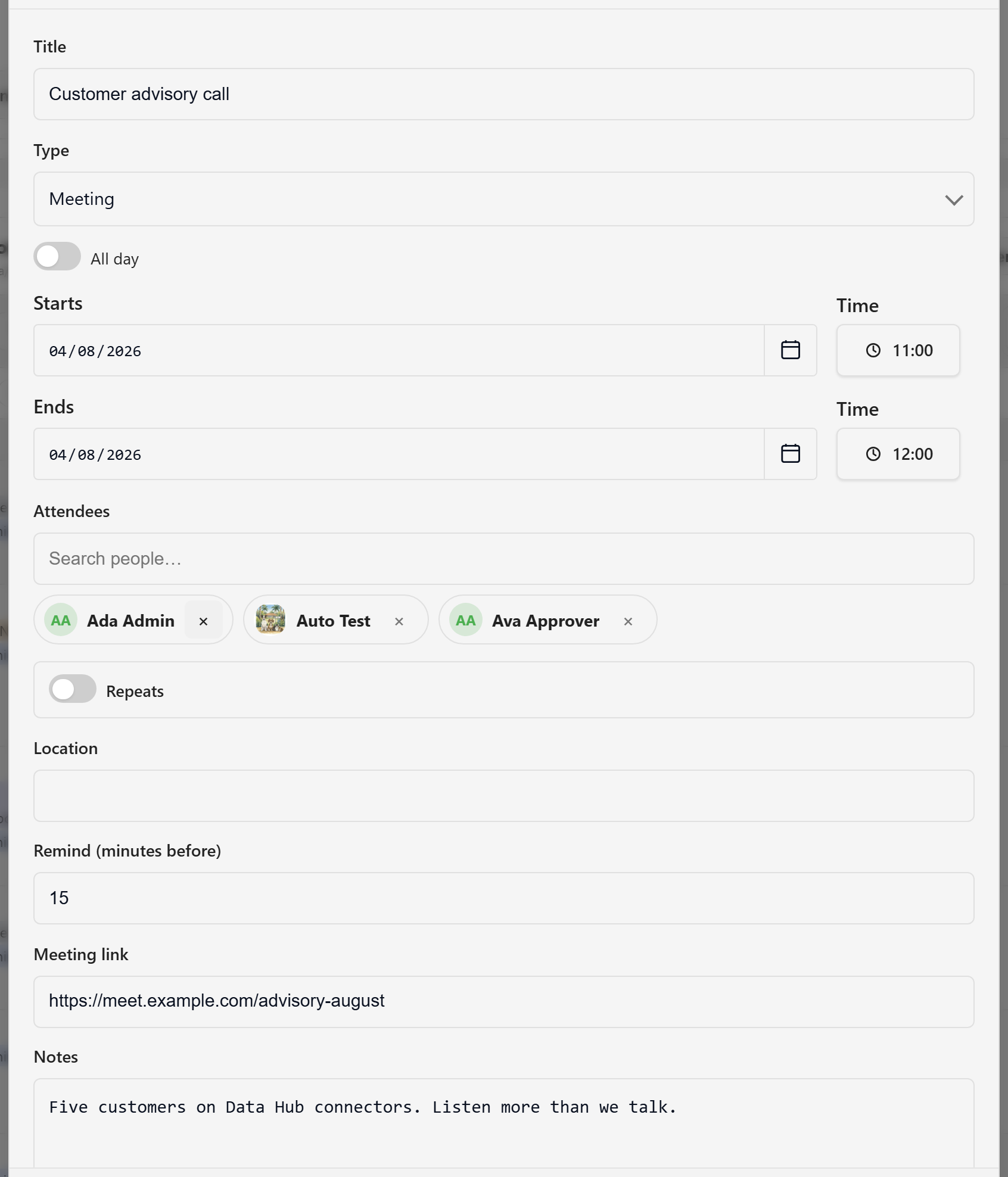
Built-in fields
Section titled “Built-in fields”| Field | Required | Notes |
|---|---|---|
| Title | Yes | Up to 255 characters. |
| Type | Yes | One of the calendar’s event types. Sets the colour and icon. |
| All day | Yes | Chooses the temporal shape: dates only, or start and end times. |
| Starts | Yes | A date when all-day, a date and time otherwise. |
| Ends | Yes | Must be on or after the start. |
| Who is away | Only for out-of-office | The person the absence belongs to. Shown only when the type is Out of office. |
| Attendees | No | Up to 200 people and 50 groups. Group selection depends on the calendar’s settings. |
| Repeats | No | A recurrence rule. See Repeat an event. |
| Location | No | Free text, up to 255 characters. |
| Remind (minutes before) | No | A whole number, 0 to 20,160 (fourteen days). |
| Meeting link | No | Must start with http:// or https://. Up to 2,000 characters. |
| Notes | No | Up to 10,000 characters. |
Custom fields added through Customise fields appear alongside these, in the position the calendar’s field set gives them.
Recurrence rule
Section titled “Recurrence rule”| Control | Values |
|---|---|
| Frequency | Day, Weekday, Week, 2 weeks, Month |
| Every | Interval, 1 to 52 |
| On these days | Weekday toggles; shown for the Week frequency |
| Ends | Never, After a number of times (1 to 500), or On a date |
A rule takes a count or an end date, never both. Occurrences past the calendar’s recurrence range are not drawn.
Event types
Section titled “Event types”| Type | Icon | Default colour |
|---|---|---|
| Event | 📌 | #5B5BD6 |
| Meeting | 👥 | #2563EB |
| Milestone | 🏁 | #16A34A |
| Deadline | ⏰ | #DC2626 |
| Out of office | 🌴 | #64748B |
| Holiday | 🎉 | #D97706 |
Names and colours are per calendar and can be changed; a calendar can hold up to 24 types. The six above cannot be removed.
Rules the form enforces
Section titled “Rules the form enforces”- An out-of-office event must cover whole days, and needs the person it belongs to.
- An end must be on or after the start.
- You can edit and delete events you created; editors can edit anyone’s.
- Recording an absence for somebody else requires an editor.
- Saving an event somebody else changed first is refused rather than overwriting it.
Permissions
Section titled “Permissions”| Action | Who |
|---|---|
| Create a calendar, change its settings | Owner or editor |
| Create an event | Any service member |
| Edit or delete an event | Its creator, or an editor |
| Record an absence for somebody else | Editor |
For what each field does in practice, see Add an event.