
Harp
Double-click empty space on the timeline to open the instrument picker, then choose Harp.
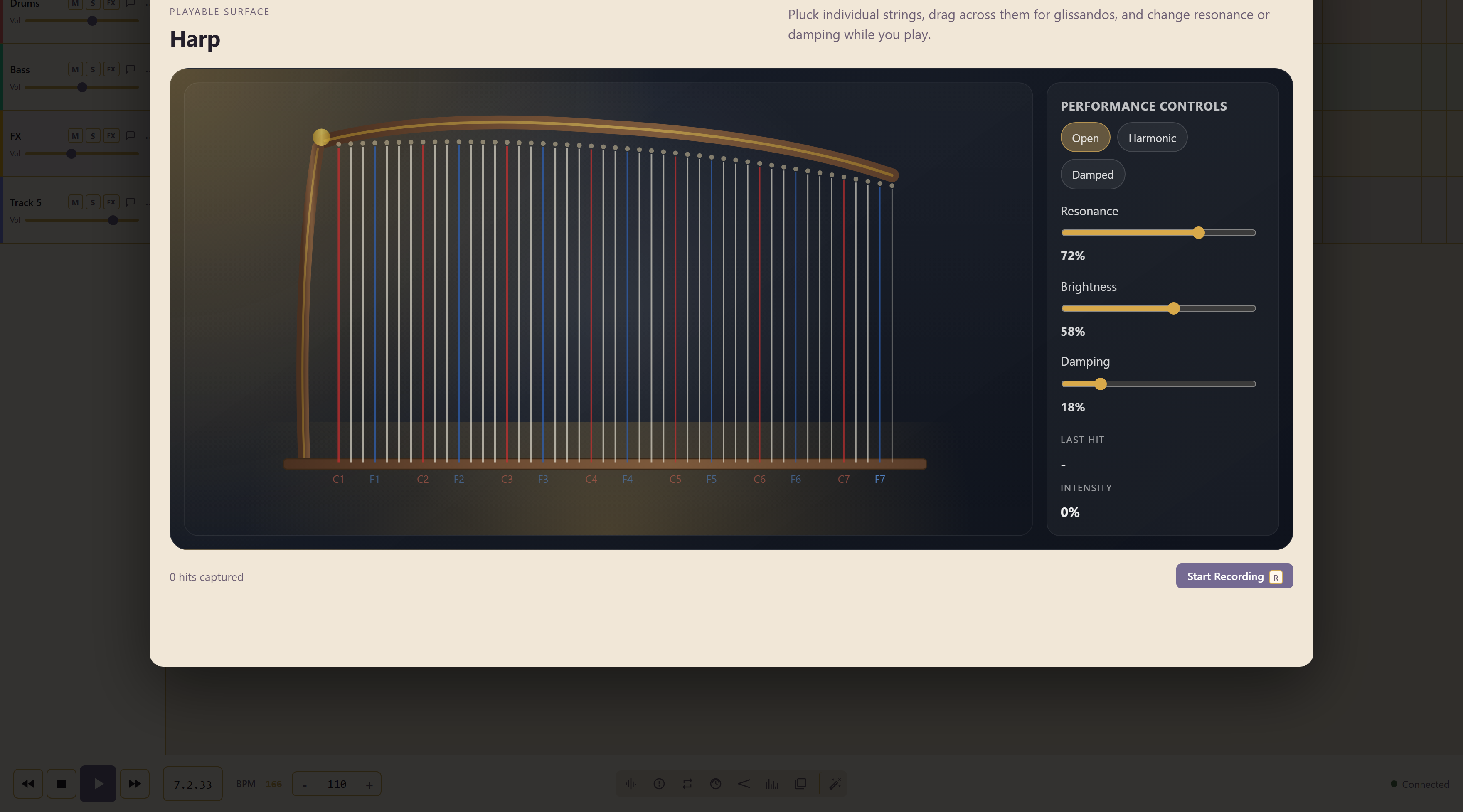
Pluck individual strings, drag across them for glissandos, and change resonance or damping while you play. The strings are labelled by octave from C1 up to F7.
Three playing modes
Section titled “Three playing modes”| Mode | Sound |
|---|---|
| Open | Strings ring freely |
| Harmonic | The lighter, bell-like harmonic tone |
| Damped | Cut short, with the ring taken off |
Three sliders
Section titled “Three sliders”Resonance, Brightness, and Damping shape it further. Resonance and damping pull against each other, so treat them as one decision about how long the instrument rings rather than two separate settings.
The glissando
Section titled “The glissando”Dragging across the strings is the reason to reach for this instrument. It gives you a real sweep rather than a sampled one, and the speed of the drag is in the sound.
Recording a take
Section titled “Recording a take”Start Recording, or the R key, begins the take, and the counter tracks the hits as you play. A last hit readout shows what your most recent gesture registered, which is usually the difference between a hit that sounded wrong and a hit you did not make the way you thought.
Play the shape before you record it. These instruments reward a second attempt, because the surface registers speed and position rather than just which note you pressed.
Related
Section titled “Related”Glockenspiel, Kalimba, Triangle, and Cello share this played-surface layout.