
Version an email
Saving and versioning are separate here, and the split is deliberate. Saving happens constantly and keeps your work. Versioning is you deciding that the current state is worth being able to return to.
Cut a version
Section titled “Cut a version”Choose Create Version in the toolbar.
The dialog tells you which number you are about to create and offers a comment. It also states what a version is: an immutable, restorable snapshot that does not publish or send the email.
Write the comment. It is optional, and it is the only thing distinguishing v4 from v5 when you come back in a month. “Tightened the intro and added the customer quote” is useful; a bare timestamp is not.
Confirm with the button, which is labelled with the version it is creating — Create v1, Create v2, and so on.
When to cut one
Section titled “When to cut one”Before a rework, so you can get back if it goes badly. After you finish something worth keeping. And after a round of tests comes back clean, because that is a known-good state.
Versions cost nothing, so erring towards more of them is fine. The comment is what makes a long list usable, not the number of entries in it.
Look at what you have
Section titled “Look at what you have”Choose Version History.
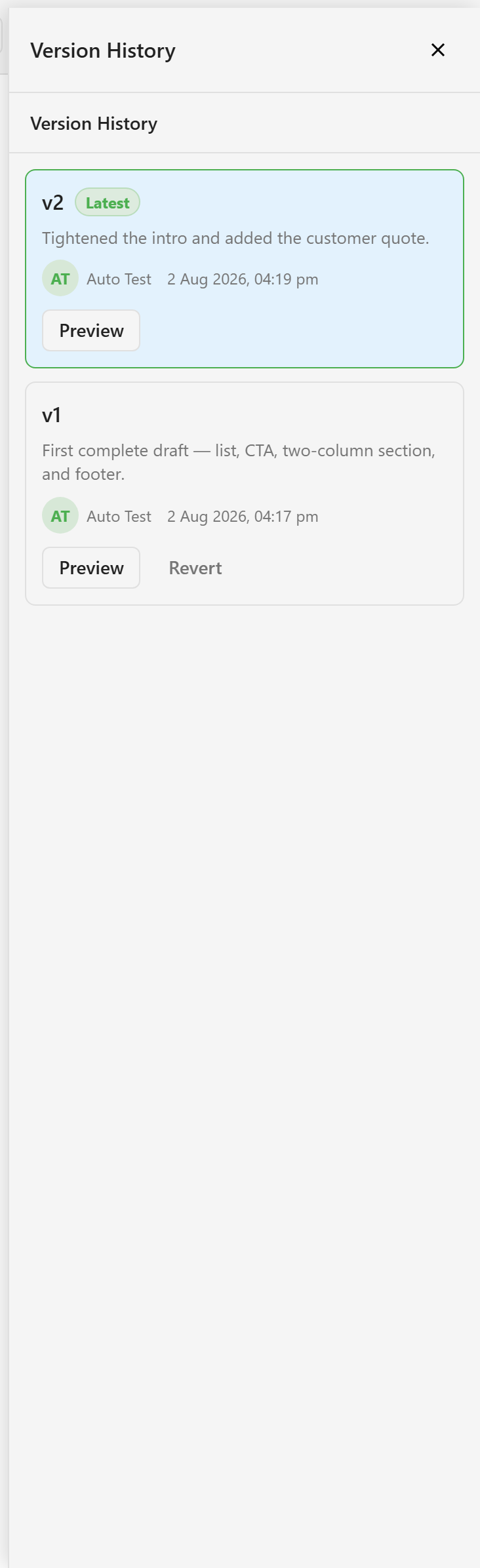
Each entry shows its number, its comment, who created it, and when. The newest carries a Latest badge.
Preview and revert
Section titled “Preview and revert”Every version has Preview, which shows you that snapshot without changing anything you are working on. Use it before reverting — the comment is a summary, and the snapshot is the truth.
Versions other than the latest also have Revert, which takes the email back to that snapshot. The latest version has no Revert button, because you are already on it.
Reverting is not destructive in the way it sounds. The versions you cut stay in the list, so reverting to v1 does not delete v2.
Versions are not history
Section titled “Versions are not history”Versions record the states somebody chose to mark. They cannot tell you what changed between them, or when, or who did it.
That is what Edit history is for — it accumulates automatically as people work, and it is where you look to answer “when did this wording change?”.
The two are complementary. Use versions to get back to a state; use edit history to find out how you left it.
Related
Section titled “Related”Reuse and versioning covers how versions differ from snippets and templates, which is the distinction people most often get wrong.