
Advanced mode
Advanced mode expands Task Boards from a workflow board into a planning and delivery workspace.
Enable Advanced mode
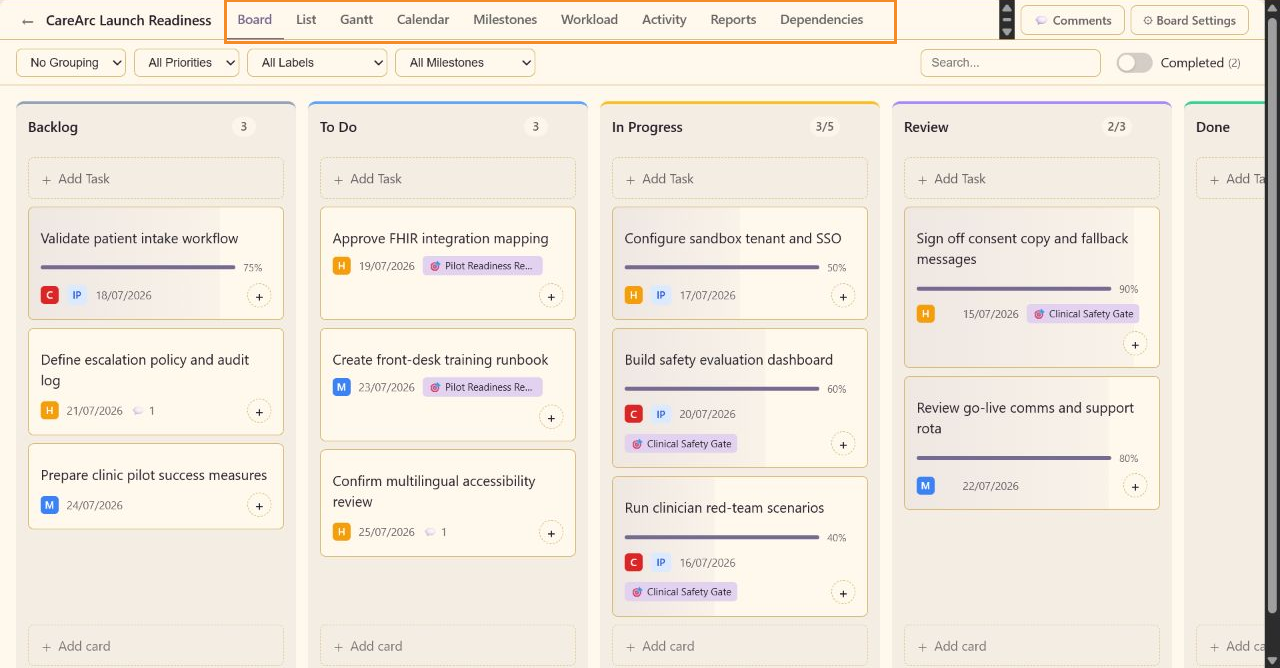
Section titled “Enable Advanced mode”Use the Advanced Mode switch in the main Task Board navigation. The change saves immediately, and the navigation gains Gantt, Milestones, Workload, Activity, Reports, and Dependencies alongside Board, List, and Calendar. Board editors can change the mode.
Added task fields
Section titled “Added task fields”Advanced tasks include Start Date, Estimated Hours, Actual Hours, expandable Actual Dates, Milestone, Predecessors, and Log Time. Advanced mode also adds a milestone filter to the shared filter row.
Added views
Section titled “Added views”- Gantt visualizes duration and timing.
- Milestones groups work under delivery gates.
- Workload summarizes capacity and assignment.
- Activity provides a board-wide event stream.
- Reports calculates delivery metrics.
- Dependencies provides chain health and graph controls.
Turning Advanced mode off hides the added fields and views. If an advanced view is open, the board returns to Board automatically. Existing task data is retained.