
Export formats & engine handoff
Which format you export depends on where the art is going. For step-by-step instructions on each format, see Export a PNG, Export a GIF or sprite sheet, and Export an engine-ready sprite sheet.
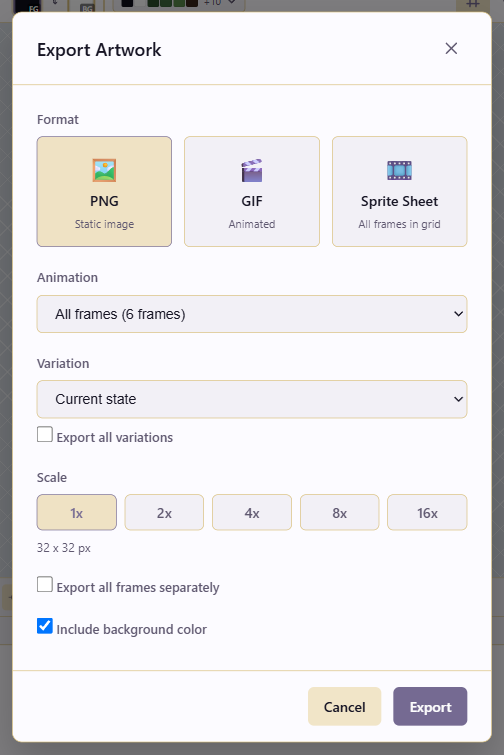
Formats compared
Section titled “Formats compared”PNG is a static image. GIF is an animated preview with a hard limit of 256 colors and binary (on/off) transparency. A sprite sheet is a single image containing every frame laid out in a grid, which is the format engines and runtimes import.
Use PNG whenever the destination needs a normal image: static sprites, icons, tiles, or a single frame. Use GIF only for previews and marketing placeholders, never as a game asset, because its color limit and binary transparency degrade pixel art quality. Use a sprite sheet whenever a game engine or runtime needs to slice frames itself.
Animation range
Section titled “Animation range”You have two choices: All frames, or a single Animation Tag. Tag-targeted export is how one project exports many animations: export the walk tag, then the attack tag, and so on. Tags are covered in Slice animations with tags.
Variations
Section titled “Variations”There are four choices. Current state exports exactly what’s on screen. Base exports the original artwork. A named variation (for example fire) exports that look. Export all variations produces one output per variation, which is the fastest way to export a skin family.
Scale options run 1x, 2x, 4x, 8x, 16x. Upscaling is nearest-neighbour, so hard pixel edges stay hard. Export at 1x for the source-of-truth and at 2x or 4x for delivery, depending on the art direction. A common pattern is to keep a 1x master and export a 2x or 4x for modern displays.
Background
Section titled “Background”Include background color is off by default, so exports come out transparent, which is what game sprites and icons need. Turn it on only when the destination requires an opaque image (some app stores do).
Format options
Section titled “Format options”PNG can export all frames separately, producing one PNG per frame for engines that import frame sequences rather than sheets. GIF uses a frame delay to set how long each frame shows. Sprite sheet uses a column count to control the grid layout, which matters because that count is part of the contract with whatever imports the sheet.
Sprite sheet layout
Section titled “Sprite sheet layout”The column count decides the rows and columns the frames land in. One row per animation (for example, 6 columns for a 6-frame walk cycle, 1 row) is the simplest contract. One row per direction (4 columns × 4 rows for a character with 4 facings of 4 frames each) is common for multi-directional characters. Power-of-two packing (8 or 16 columns) suits atlas importers.
Record whatever you choose. The Publish Version comment is the natural home: a note like walk_sheet: 6 cols × 4 rows, 64×64 cells (32×32 @ 2x), row order: down, up, left, right places the contract with the asset for whoever wires up the importer.