
Board view
Board view presents work as cards moving through named workflow columns. CareArc uses Backlog, To Do, In Progress, Review, and Done.
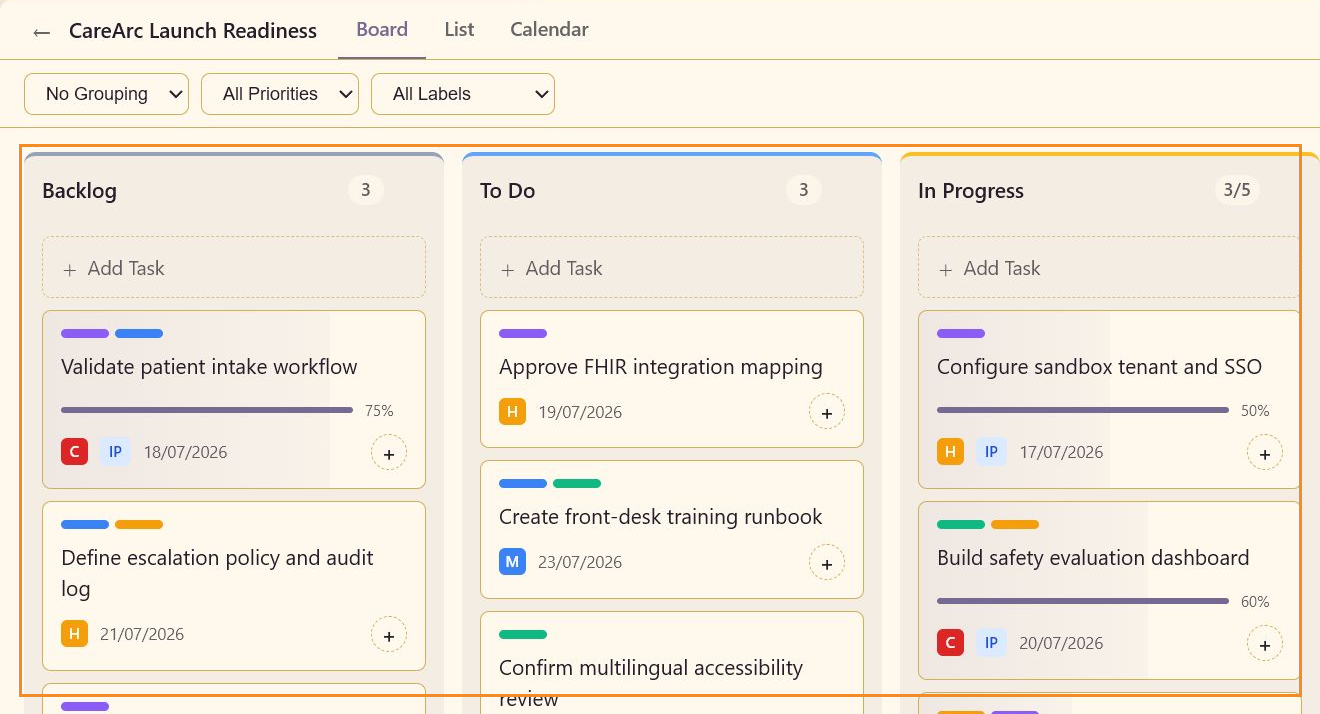
Column controls
Section titled “Column controls”Each column shows its name and visible task count. A configured WIP limit appears as a fraction, such as 3/5 for In Progress. Use Add Task or Add card to create work in that column. Add column extends the workflow when board settings permit it.
Card signals
Section titled “Card signals”A card can show its subject, custom or built-in label bars, completion percentage, priority chip, status chip, due date, milestone, and comment count. The + action opens assignment, while the delete action removes the card after confirmation.
Workflow movement
Section titled “Workflow movement”Move a card to the column that represents its real handoff. Keep the task Status field aligned with the column so List, Reports, and Activity all report the same state.
See Columns and WIP for configuration and Task details for fields inside a card.