
My Tasks
My Tasks is the cross-platform work queue available from the main navigation.
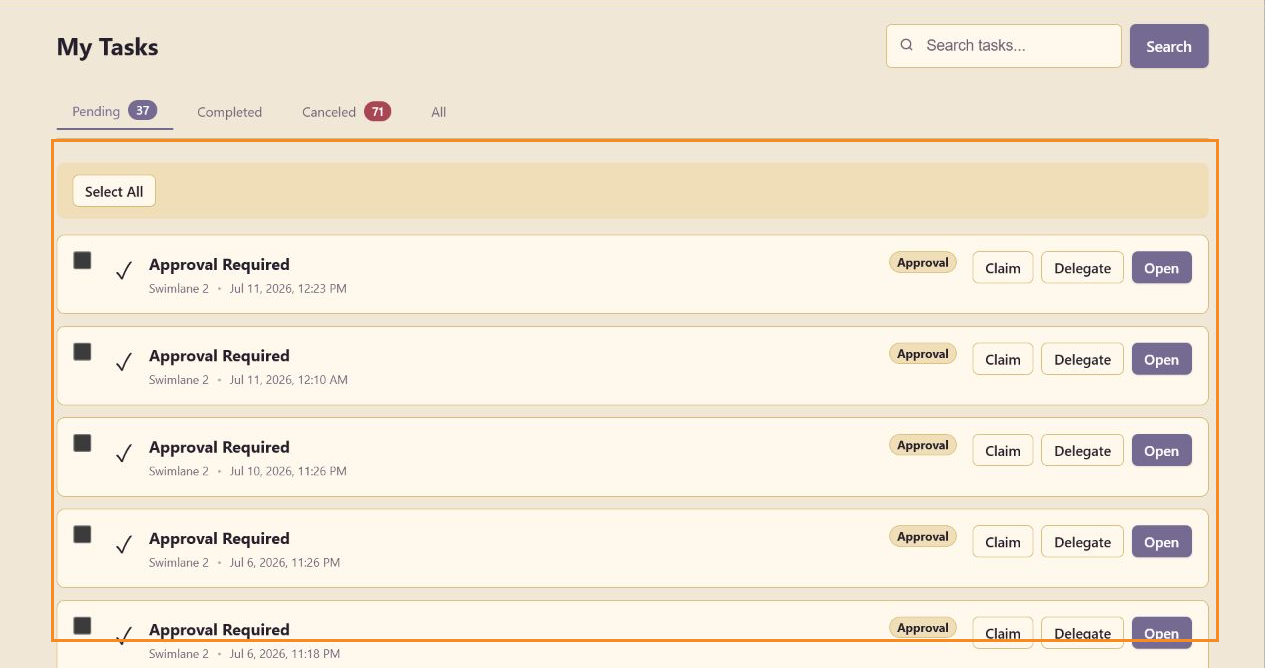
Search and state tabs
Section titled “Search and state tabs”Search filters the queue by text. Pending, Completed, Canceled, and All switch the task state; counts appear beside states with available records.
Selection
Section titled “Selection”Select an individual checkbox or use Select All for the visible queue. Selection supports bulk-oriented workflows when actions are available.
Task actions
Section titled “Task actions”Claim assigns an available task to you. Delegate passes the task to another eligible person. Open enters the task’s source workflow. Queue cards identify the task type, source, and creation time.
My Tasks includes workflow and approval tasks from across the platform; return to a service Task Board for columns, milestones, reporting, and board comments.
Administrators can manage workflow tasks across users and services in Task Management, including reassignment, delegation, cancellation, recoverable removal and restoration.