
Send a test
A test send is the only check that involves a real email client. Everything else in the editor is a simulation, and simulations do not reproduce what Outlook does to a layout.
Send it
Section titled “Send it”Choose Test in the toolbar.
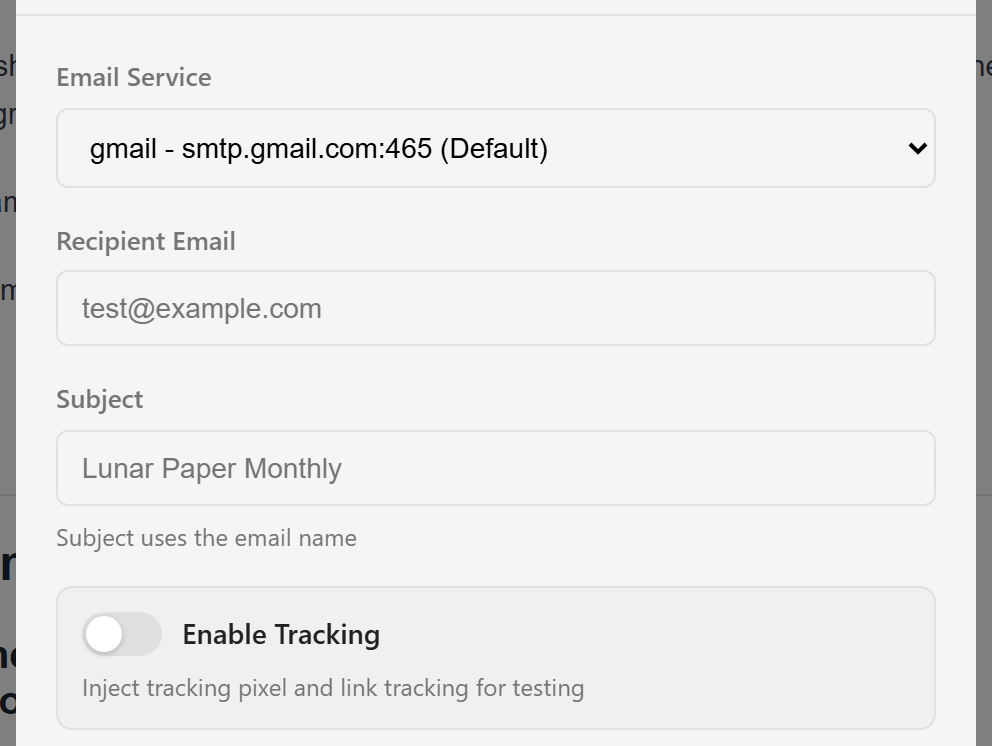
Email Service picks which configured sender delivers it. One is marked (Default).
Recipient Email is where it goes. Your own address, for now.
Subject defaults to the email’s name, which the hint below the field says. Override it if you want to test a real subject line — worth doing, because the subject decides whether the email gets opened at all.
Enable Tracking adds a tracking pixel and rewrites links for tracking. Leave it off for an ordinary test. Turn it on only when you are specifically testing that tracking works, because it changes the links in the email you receive.
Choose Send Test Email to send, or Cancel to back out.
What arrives
Section titled “What arrives”The email as a recipient would get it, with one difference: variables show their default values, because a test has no recipient record behind it. Personalise with variables covers why the defaults are worth setting carefully.
What to look at
Section titled “What to look at”Open it on a phone first. That is where most email is read and where layouts break.
Then check the things the editor cannot tell you:
Do the images load? Many clients block them by default, so look at the email with images off and see whether it still makes sense. If it does not, your alt text needs work.
Do the links go where they should? Click them. A link written without https:// often survives the editor and fails in an inbox.
Does it look right in Outlook? If your audience is corporate, this is the test that matters. Outlook renders with a different engine from every other client and is the usual source of “it looked fine when I built it”.
Is the sender name and address what you expect? That comes from the email service, not from anything in the editor.
Send more than one
Section titled “Send more than one”Send a test, fix what you find, and send another. The drawer keeps your recipient address, so the second and third rounds take seconds.
It is worth sending the final one to a colleague as well. You have read your own copy enough times to stop seeing it.
Version an email cuts a restorable snapshot once the tests come back clean, which is the natural point to mark one.