
Work on a chart with other people
Several people can have the same chart open and edit it at once. Changes appear as they are made, and you can see who else is there.
See who is here
Section titled “See who is here”The people icon in the top bar carries a count of everyone active. Hover it for the list.
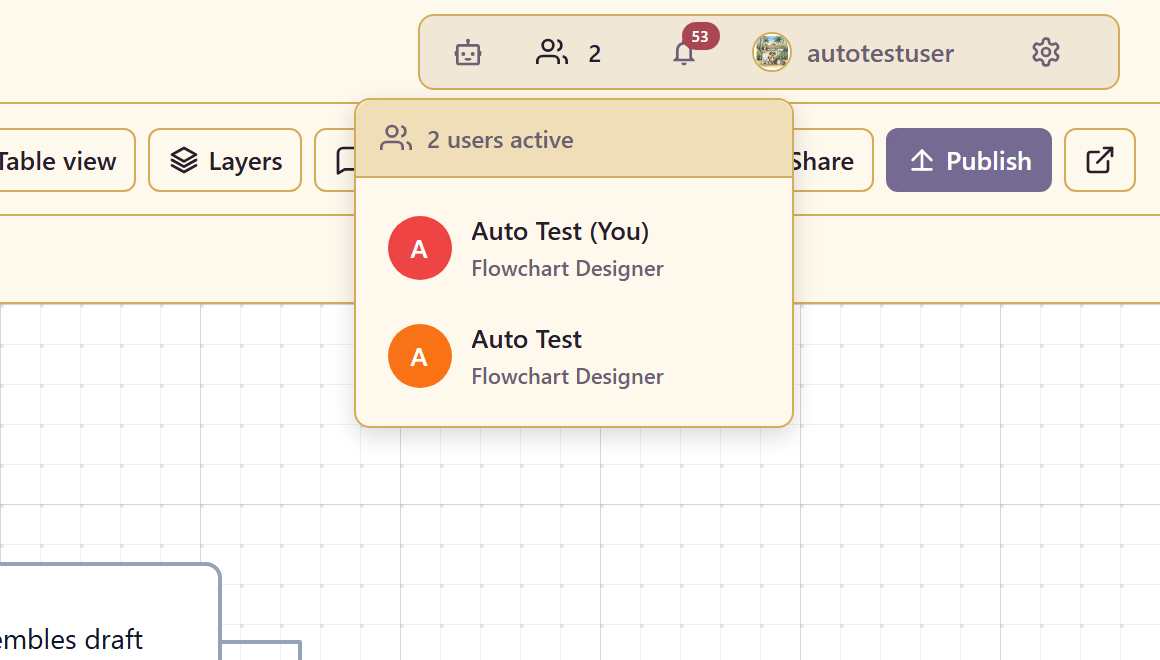
Each person is listed with their name and the page they are on, and you are marked as (You).
Presence covers the whole chart, so someone working on page three still shows in the list. Cursors are scoped to the page you are looking at, so you only see pointer movement from people on the same page.
Give people access first
Section titled “Give people access first”Presence only tells you who is already in. Share in the toolbar is how someone gets in.
Editing needs edit access to the service — owner, editor, or admin. Anyone with read access can open the chart but cannot change it. Permissions has the detail.
Running a mapping session
Section titled “Running a mapping session”Live editing changes what a mapping workshop can be. A few things make it work.
Agree who draws. Three people adding shapes at once produces a mess quickly. The usual pattern that works is one person driving the canvas while everyone else watches and talks, with others jumping in to fix their own area.
Split by page or by area. If several people are genuinely building at the same time, give each a page, or a clearly separate region of the canvas. Two people editing the same three shapes is where conflicts come from.
Use comments for disagreements. A comment attached to a shape survives the session; a point made out loud does not. When someone says “that step is not how it works”, ask them to comment on the shape.
Conflicts
Section titled “Conflicts”If two people change the same thing at once, one change wins and the other is told: an edit conflict detected warning naming who overwrote the changes.
It does not stop you working, and there is no merge. Treat it as a signal that you and someone else are in the same spot, and one of you should move.
Undo will get your version back if the overwrite mattered.
When the connection drops
Section titled “When the connection drops”If live collaboration becomes unavailable you get a warning saying so, with a retry.
You can keep editing. What stops is presence and live updates — you will not see other people’s changes and they will not see yours until the connection comes back. That is worth knowing during a workshop, because the room can carry on talking while two people have silently diverged.
If you see that warning, stop editing until it clears, or agree that only one person continues.
Working asynchronously instead
Section titled “Working asynchronously instead”Live editing is not always the right tool. For review rather than co-authoring:
Publish the chart with Allow comments and send that link. Reviewers can leave feedback without edit access, which also means they cannot accidentally move things.
That is usually better for a wide audience. Live editing suits a small group actively building something together.
Related
Section titled “Related”Review and publish covers the asynchronous path. Organise a large chart covers pages, which are also how you keep several people out of each other’s way.