
Emails
Emails is where a service builds the email it sends. You stack blocks — a heading, some text, a button, a footer — and the module turns them into HTML that survives being opened in Outlook.
It builds templates. It does not send campaigns. Sending to a list happens in Marketing, and each template card has a Use in Campaign button that hands the template over.
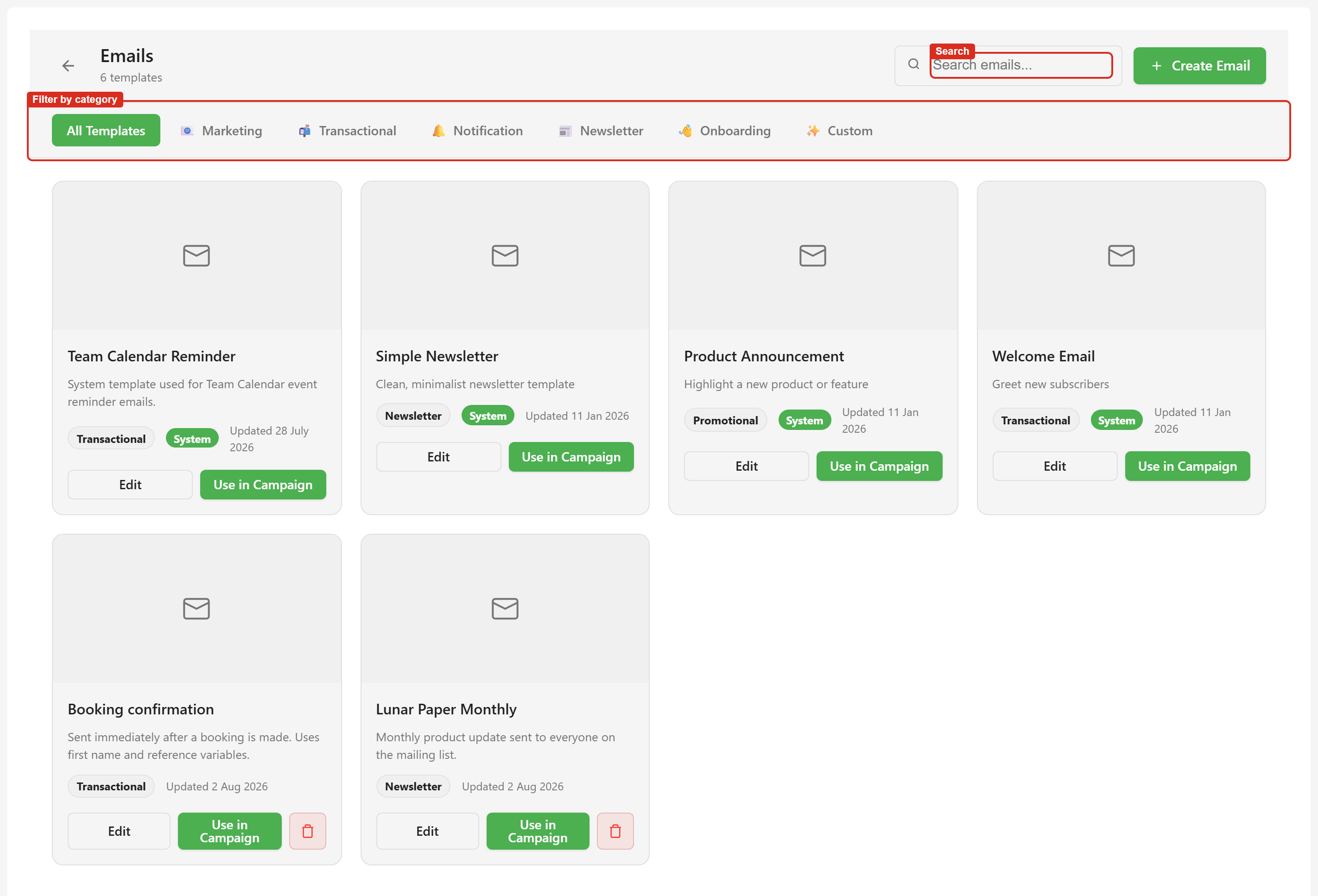
Where Emails lives
Section titled “Where Emails lives”Open a service and choose Emails under Communications. It carries a Beta badge.
The module opens on a grid of template cards, with a search box and a row of category filters above them.
What you get
Section titled “What you get”Every template is a list of blocks. There are 27 block types across four groups, from a plain heading to a pricing table, and each one has a properties panel for its text, colours, and alignment. Block catalogue lists them all.
Three things make this more than a drag-and-drop editor.
It checks your work. An accessibility checker scores the email out of 100 and points at the block causing each problem. A spam checker scores it separately and explains what would trip a filter.
It previews properly. Desktop, tablet, and mobile views, plus a full preview and a real test send to your own inbox.
It remembers. You can save a block as a snippet and reuse it anywhere in the service, save the whole email to a template library, and cut restorable versions as you go.
Two things worth knowing first
Section titled “Two things worth knowing first”Some templates are marked System. They ship with the platform, they are shared across every service, and you cannot edit or delete them. Use Duplicate to get an editable copy.
Blocks sit side by side when their layout widths add up to 100%. This is the only layout control there is — there is no free canvas and no dragging one block next to another. Blocks and layout explains it.
Where to go
Section titled “Where to go”| If you want to | Go to |
|---|---|
| Build an email end to end | Quickstart |
| Follow a specific workflow | Guides — seven task walkthroughs |
| Find which page covers a capability | Emails capabilities |
| Look up a block type | Block catalogue |
| Look up a control in the editor | Editor toolbar reference |
| Understand how a layout is put together | Blocks and layout |
| Understand snippets, templates, and versions | Reuse and versioning |
| Check who is allowed to do what | Permissions reference |
| Fix something that is not behaving | Troubleshooting |
The examples in these screenshots
Section titled “The examples in these screenshots”Captures use two emails built for this documentation. Lunar Paper Monthly is a newsletter with a heading, an intro, a bulleted list of changes, a call-to-action button, a two-column section, a customer quote, social links, and a footer. Booking confirmation is a transactional email with a details table and two variables, first_name and booking_reference. The other four templates in the grid ship with the platform.