Open the in-app Keyboard Shortcuts panel from the top toolbar to view or rebind any of these. Click a shortcut to change it; press Escape to cancel rebinding.
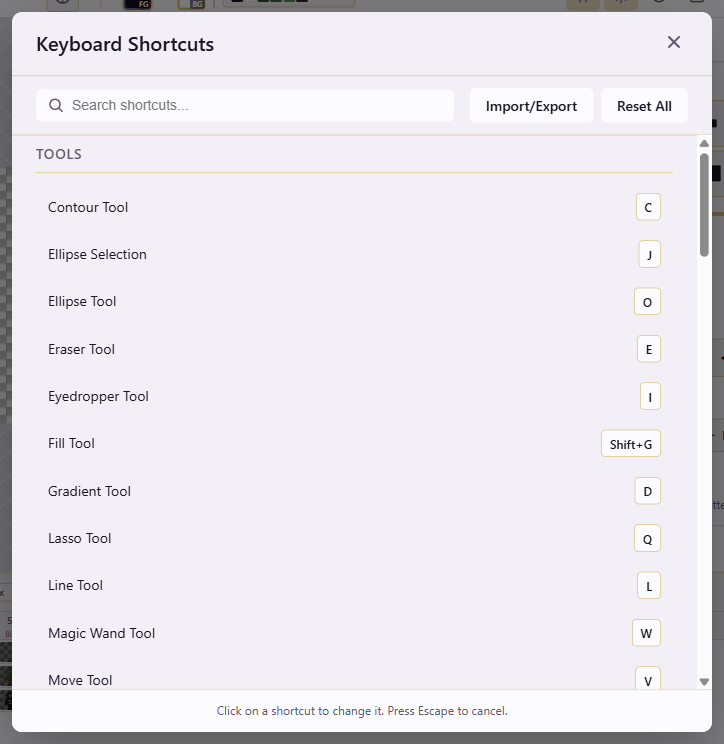
The tables below are the canonical shortcut map. If a key shown elsewhere conflicts with this page, this page is authoritative.
| Action |
Shortcut |
| Contour Tool |
C |
| Ellipse Selection |
J |
| Ellipse Tool |
O |
| Eraser Tool |
E |
| Eyedropper Tool |
I |
| Fill Tool |
Shift+G |
| Gradient Tool |
D |
| Lasso Tool |
Q |
| Line Tool |
L |
| Magic Wand Tool |
W |
| Move Tool |
V |
| Pencil Tool |
B |
| Polygon Tool |
P |
| Rectangle Tool |
U |
| Rectangle Selection |
M |
| Spline/Curve Tool |
S |
| Tile Stamp Tool |
T |
| Action |
Shortcut |
| Copy |
Ctrl+C |
| Cut |
Ctrl+X |
| Delete Selection |
Delete |
| Delete Selection (Alt) |
Backspace |
| Deselect |
Ctrl+D |
| Paste |
Ctrl+V |
| Redo |
Ctrl+Y |
| Redo (Alt) |
Ctrl+Shift+Z |
| Save |
Ctrl+S |
| Select All |
Ctrl+A |
| Undo |
Ctrl+Z |
| Action |
Shortcut |
| Swap Colors |
X |
| Action |
Shortcut |
| Toggle Fullscreen |
F11 |
| Toggle Grid |
G |
| Toggle Navigator |
N |
| Zoom In |
Ctrl+= |
| Zoom Out |
Ctrl+- |
| Zoom to Fit |
Ctrl+0 |
| Action |
Shortcut |
| Flip Horizontal |
Shift+H |
| Flip Vertical |
Shift+V |
| Rotate 90° CCW |
Ctrl+Alt+R |
| Rotate 90° CW |
Ctrl+Shift+R |
| Action |
Shortcut |
| First Frame |
Home |
| Last Frame |
End |
| New Frame |
Ctrl+Shift+N |
| Next Frame |
. |
| Play/Pause |
Space |
| Previous Frame |
, |
| Solo selected layer |
S |
| Action |
Shortcut |
| Duplicate Layer |
Ctrl+J |
| Merge Down |
Ctrl+E |
| New Layer |
Ctrl+Alt+N |
| Toggle Layer Visibility |
Alt+H |
S does two things, and the active context decides which one fires. With a drawing tool active, pressing S switches to the Spline/Curve tool. While animation is playing, pressing S solos the currently selected layer. To switch tools during playback, pause playback first; otherwise S solos the active layer.
The shortcuts panel has Import and Export buttons at the top: save custom bindings to a file, load them on another machine, or share them with a team. Reset All returns every binding to the defaults shown above.
