
Build a launch readiness board
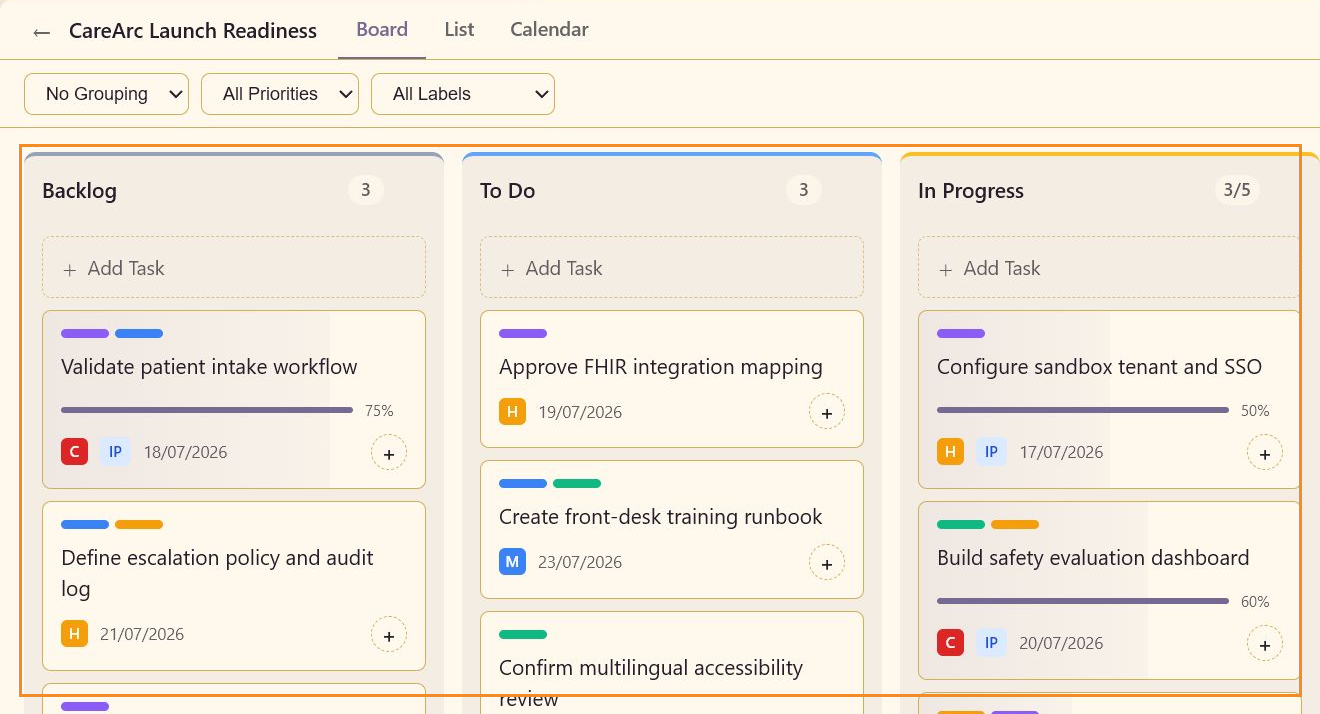
Build a board that a launch team can use in its weekly operating review. By the end, CareArc Launch Readiness contains work for clinical design, platform readiness, safety, accessibility, training, and launch operations, and each card shows enough to decide what moves next.
1. Start from the service context
Section titled “1. Start from the service context”Open the service that owns the rollout and select Task Boards Beta. Create CareArc Launch Readiness with a description that names the outcome, audience, and scope. A board description is useful when several boards exist in the same service.
2. Use columns for handoffs
Section titled “2. Use columns for handoffs”Keep Backlog, To Do, In Progress, Review, and Done as the initial flow. These states separate not-yet-committed work, ready work, active work, work awaiting a decision, and finished work.
3. Seed the board by workstream
Section titled “3. Seed the board by workstream”Add at least one task for each workstream:
- Clinical:
Validate patient intake workflow. - Platform:
Configure sandbox tenant and SSOandApprove FHIR integration mapping. - Safety:
Build safety evaluation dashboardandRun clinician red-team scenarios. - Enablement:
Create front-desk training runbook. - Accessibility:
Confirm multilingual accessibility review. - Launch operations:
Review go-live comms and support rota.
Give each task a due date, a priority, and one or two labels. Descriptions should state the decision or evidence needed, not repeat the title.
4. Add a review checkpoint
Section titled “4. Add a review checkpoint”Place Sign off consent copy and fallback messages in Review with High priority and 90% completion. The card should show which decision is still outstanding, without anyone having to open the editor.
5. Keep completed work available
Section titled “5. Keep completed work available”Completed tasks are hidden by default when the board contains them. Use the Completed toggle when you need to show the historical launch window or confirm that a finished task is present. Keep completed work in the board when it provides useful evidence for a release review.
Where the launch stands
Section titled “Where the launch stands”The board now shows where the launch stands: work is grouped by workflow state, priority and labels show risk, dates are visible, and review work is separate from execution work. Continue with Triage and prioritize work to prepare for the next operating review.