
Slide panel reference
The slide panel manages the deck’s ordered structure.
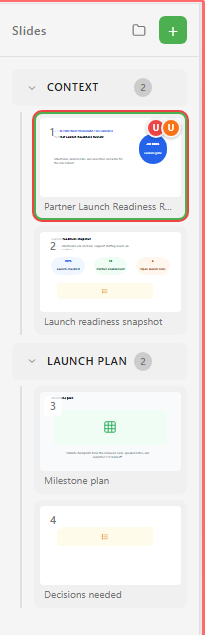
| Control or state | Purpose |
|---|---|
| Slides header | Shows the slide navigator. |
| Folder icon | Opens or manages presentation organization when available. |
| Add slide | Creates a new slide. |
| Add Section | Creates a section group. |
| Section collapse | Hides or shows the section’s slides. |
| Add Slide to Section | Adds a slide directly inside the section. |
| Slide thumbnail | Selects a slide. |
| Drag and drop | Reorders slides or moves them between sections. |
| Comment badge | Shows unresolved or existing comments for a slide. |
| Add comment | Starts a slide comment. |
| Delete slide | Removes the slide. |
| Context menu | Provides slide actions such as duplicate, add, delete, and move to section. |
Use sections to keep long decks readable. Name a section after the part of the presentation it holds, not after a run of slide numbers.