
Outbound email connectors
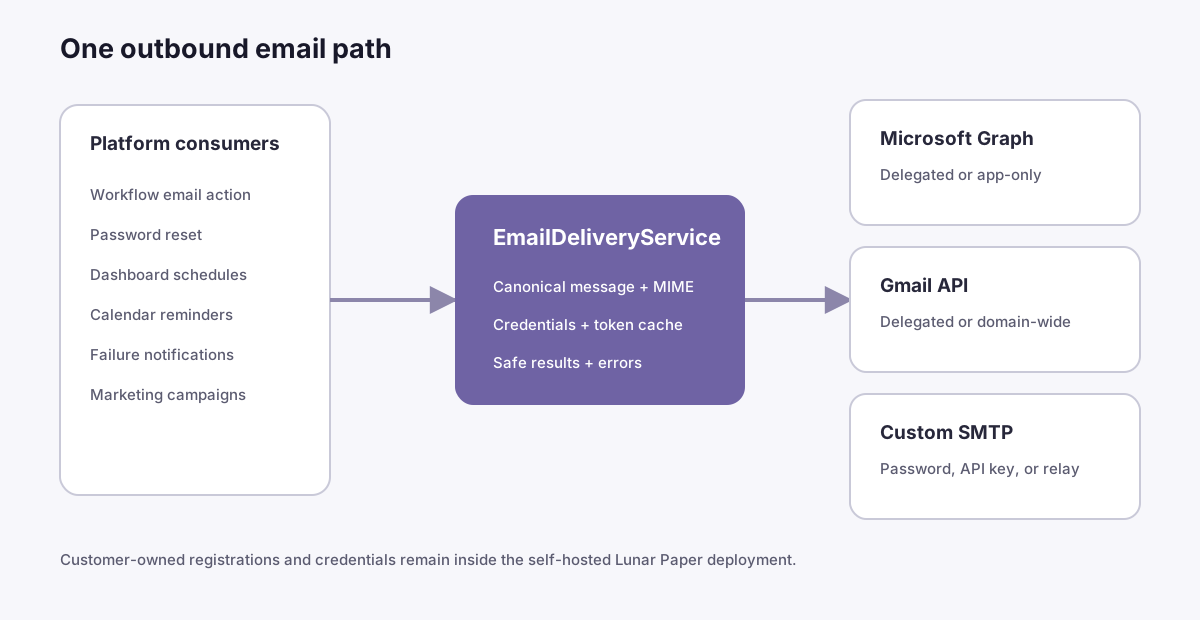
Lunar Paper sends outbound mail through a connector owned by your organization. The self-hosted server stores the credential; Lunar Paper does not operate a shared multi-customer Microsoft or Google OAuth application.
If you are configuring Microsoft sign-in, Entra Team membership, and workflow mail together, begin with Microsoft Entra and Microsoft 365. It explains why SSO, optional directory user sync, and mail use separate Entra applications.
Choose a connector
Section titled “Choose a connector”Every connector has a sender policy:
- Personal / single mailbox locks every message to the registered sender. Workflow, task, campaign, booking, scheduled-report, and other email features cannot substitute another From address.
- Corporate / organization-managed allows email features to request a From address when the selected transport supports it. You can optionally enter an exact-domain allowlist. Lunar Paper checks that policy before submission, but the provider or SMTP relay still makes the final Send As decision.
Connected Microsoft and Google mailboxes are personal connectors. Microsoft app-only and Google domain-wide delegation are corporate connectors. Authenticated SMTP can be either; an unauthenticated trusted relay must be corporate. Existing connectors created before this setting was introduced keep their previous delivery behavior but do not expose a From override until an administrator classifies and saves them.
The same capability controls sender fields in workflow email actions, human-task notifications, campaign settings, and connector test sends. Platform-generated messages continue to use the connector’s default sender.
| Connector | Use it when | Availability |
|---|---|---|
| Microsoft 365 — connected mailbox | A person can authorize the sending mailbox | Generally available |
| Microsoft 365 — organization application | An unattended workload must send from a designated Exchange Online mailbox | Preview |
| Google Workspace — connected mailbox | A person can authorize the Gmail or Workspace mailbox | Generally available |
| Google Workspace — domain-wide delegation | A Workspace administrator needs unattended impersonation of a designated sender | Preview |
| Custom SMTP | Your organization or transactional provider exposes SMTP | Generally available |
All connectors support a named sender, To, Cc, Bcc, Reply-To, text, HTML, ordinary attachments, and inline CID images. Microsoft Graph and Gmail API are marked not suitable for bulk delivery. Marketing requires a connector-bound acknowledgement before either provider can schedule or send a campaign.
Provider acceptance means the provider accepted the submission. It is not proof that a recipient received, opened, or even retained the message.
Before you begin
Section titled “Before you begin”- Set
APP_URLto the externally reachable Lunar Paper origin. OAuth callback URLs are built only from this value. - Set and back up
EMAIL_ENCRYPTION_KEY. Lunar Paper encrypts refresh tokens, client secrets, certificate private keys, SMTP passwords, and Google service-account private keys with this key. - Sign in as a Lunar Paper administrator.
- Open Administration → Integrations → Email Configuration.
- Create a separate provider registration for outbound email. Do not add mail permissions to the application used for Lunar Paper SSO.
Microsoft 365 — connected mailbox
Section titled “Microsoft 365 — connected mailbox”This personal mode uses the OAuth authorization-code flow with PKCE and offline
access. Lunar Paper requests delegated Mail.Send, and the configured sender
must be the mailbox being authorized. Microsoft documents delegated Mail.Send for both work or
school accounts and personal Microsoft accounts. Microsoft Graph permissions reference
Register the application
Section titled “Register the application”-
In Microsoft Entra admin center → App registrations, select New registration.
-
Name it for outbound email, for example
Lunar Paper Mail. -
For a normal organization deployment, select accounts in this organizational directory only. For a free Outlook.com test, select the option that also supports personal Microsoft accounts.
-
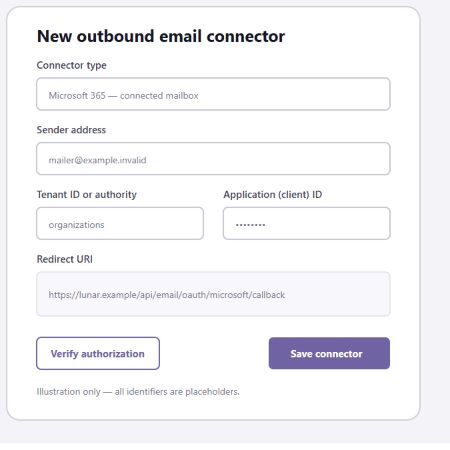
Under Authentication, add a Web redirect URI. Copy the exact redirect URI displayed by the Lunar Paper wizard:
https://your-lunar-paper-origin.example/api/email/oauth/microsoft/callback -
Under API permissions → Microsoft Graph → Delegated permissions, add
Mail.Send. -
Under Certificates & secrets, create a client secret and copy its Value immediately.
-
In Lunar Paper, enter the application client ID, client secret, sender, and:
- the tenant ID for a single-tenant organization;
commonfor organizational plus personal-account testing; orconsumersfor personal Microsoft accounts only.
-
Save the connector, select Authorize mailbox, finish Microsoft consent, then select Verify authorization.
-
Use Send test email for a separate submission test.
Microsoft 365 — organization application
Section titled “Microsoft 365 — organization application”App-only mode has no signed-in user. It uses Graph application Mail.Send and
submits through /users/{sender}/sendMail. Microsoft describes application
Mail.Send as permission to send as any user, so constrain the application to
the intended mailboxes before production use. Microsoft app-only access
Register and authorize
Section titled “Register and authorize”- Create a separate, single-tenant app registration.
- Add Microsoft Graph → Application permissions → Mail.Send.
- Have a tenant administrator grant admin consent.
- Choose one credential mode:
- Client secret: create a secret and enter its value in Lunar Paper.
- PEM certificate: upload the public certificate to Entra, then enter the matching PEM certificate and PEM private key in Lunar Paper. Lunar Paper rejects a mismatched pair and displays certificate expiry metadata.
- Enter the tenant ID, application client ID, and a default licensed sender mailbox. Optionally restrict selectable workflow senders with the exact-domain allowlist.
- Create an Exchange Online application access policy with
RestrictAccess, scoped to a mail-enabled security group containing only the permitted sender mailboxes. Test the policy for every mailbox that Lunar Paper may select before enabling it. Microsoft documents that this restriction can narrow an app even after Graph applicationMail.Sendis granted. Microsoft Graph permissions reference - Alternatively, use Exchange Online Application RBAC with the
Application Mail.Sendrole and a management scope. Do not leave a separate tenant-wide EntraMail.Sendgrant in place when relying on RBAC scoping, because Exchange permission grants are additive. Exchange Online Application RBAC - Save, verify, and send a test message.
Use more than one sender in Automation
Section titled “Use more than one sender in Automation”Choose Corporate / organization-managed for an app-only connector that is deliberately authorized to send as more than one Exchange Online mailbox. Enter a default sender and, when useful, an exact-domain allowlist. The allowlist is a Lunar Paper submission check; Exchange application access policies or Application RBAC remain the authoritative mailbox restriction.
In the workflow designer, select the connector in Send Email. A From Address field appears. Leave it empty to use the connector default, or enter the complete address of another mailbox inside the Exchange scope. Save and run a dry test first, then enable Run for real for one controlled delivery. Repeat the live test for every From address that production workflows may use.
See Microsoft Entra and Microsoft 365 for the end-to-end checklist and Send Email action reference for the workflow fields.
Validate in an isolated Microsoft 365 tenant
Section titled “Validate in an isolated Microsoft 365 tenant”Use an isolated development tenant, a time-limited business trial, or a consenting non-production tenant when you need to prove the corporate sender path. A personal Outlook.com mailbox can validate the connected-mailbox flow, but it cannot reproduce Exchange Online application permissions, directory users, group claims, or mailbox-scoped app-only sending.
Prepare the tenant before registering the email application:
-
Create only synthetic test users and assign each sender an Exchange Online-capable licence.
-
Wait until each licensed mailbox appears in Exchange Online before testing. Directory creation and mailbox provisioning are separate operations.
-
Create assigned security groups when the same tenant will also exercise Entra SSO role and Team mapping. Dynamic groups are not required.
-
Keep the tenant administrator as a recovery identity. Use ordinary licensed test users as message senders and SSO test identities.
-
Use purpose-specific app registrations. SSO and mail require two; add the third only when never-signed-in users must be searchable:
Registration Purpose Permissions Lunar Paper SSO Interactive OIDC sign-in and group claims OpenID Connect scopes; no Graph mail permission Lunar Paper Directory Sync Optional background user discovery Microsoft Graph application User.Read.All; no mail permissionLunar Paper Mail Unattended organization email Microsoft Graph application Mail.Send, restricted in Exchange -
In Exchange Online, scope the mail application to a mail-enabled security group or Application RBAC management scope containing only the permitted sender mailboxes.
-
Test an allowed sender, then test a mailbox outside the scope and confirm the second attempt is rejected.
The Entra groups used for Lunar Paper roles do not automatically restrict the email application. OIDC group claims and Exchange app authorization are two separate controls, even when they refer to the same people.
For SSO setup in the same tenant, see Microsoft Entra SSO and Team sync. To cache users before their first sign-in, see Directory user sync (preview).
Microsoft recommends certificates rather than client secrets for production confidential clients. Microsoft credential guidance
Rotate a certificate
Section titled “Rotate a certificate”- Create the replacement key pair before the existing certificate expires.
- Upload the new public certificate to the same Entra app registration while leaving the old certificate active.
- Edit the Lunar Paper connector and replace both PEM fields in one save.
- Verify authorization and send a test message.
- Remove the old certificate from Entra only after the new credential passes.
Blank credential fields during an edit mean leave the existing credential unchanged.
Google Workspace — connected mailbox
Section titled “Google Workspace — connected mailbox”This mode uses OAuth authorization code with PKCE, offline access, and only
https://www.googleapis.com/auth/gmail.send. Google classifies gmail.send as
a sensitive send-only scope; Lunar Paper does not request the broader restricted
mail.google.com scope. Gmail API scopes
-
In Google Cloud Console, create or select a customer-owned project.
-
Enable the Gmail API.
-
Configure the OAuth consent screen. For a free test, use an External app in testing mode and add only the dedicated test Gmail account as a test user.
-
Create an OAuth client ID → Web application.
-
Add the exact redirect URI shown in Lunar Paper:
https://your-lunar-paper-origin.example/api/email/oauth/google/callback -
Enter the client ID, client secret, and sender in Lunar Paper.
-
Save, select Authorize mailbox, complete Google consent, and then verify.
Use the authorized Gmail address as the sender unless that account has already configured and verified the requested address as a Gmail Send mail as alias.
Gmail API submissions are RFC email messages encoded as base64url in the
raw field. Google’s Gmail sending guide
Google Workspace — domain-wide delegation
Section titled “Google Workspace — domain-wide delegation”This Preview mode requires a Google Workspace organization and a super administrator. It does not work with a standalone free Gmail account.
-
Create a Google Cloud service account and enable domain-wide delegation.
-
Create and download a JSON service-account key. Treat the file as a secret.
-
In Google Admin console → Security → Access and data control → API Controls → Domain-wide delegation, add the service account’s numeric client ID.
-
Authorize exactly this scope:
https://www.googleapis.com/auth/gmail.send -
In Lunar Paper, select the domain-wide mode, paste the JSON once, and enter a default Workspace sender to impersonate. Optionally restrict selectable workflow senders with the exact-domain allowlist.
-
Save and verify. Authorization can take several minutes to propagate and in some cases up to 24 hours. Google domain-wide delegation
Rotate a service-account key
Section titled “Rotate a service-account key”Create a new key, edit the connector, paste the new JSON, verify, then delete the old key in Google Cloud. Never email the JSON key or attach it to a support ticket.
Custom SMTP
Section titled “Custom SMTP”For a private @gmail.com account, follow
Connect a personal Gmail mailbox for the
Google app-password and exact SMTP settings.
Choose one authentication mode:
- Password or API key: enter the provider’s SMTP username and password. For providers such as SendGrid or Mailgun, the password field can contain the SMTP API key expected by that provider.
- Trusted relay: Lunar Paper sends no SMTP authentication. Use this only for a relay that restricts clients by network or another trusted control.
Choose Personal / single mailbox when the SMTP credential is allowed to send only as its registered address. Choose Corporate / organization-managed for a trusted organizational relay or provider account that is deliberately authorized for multiple senders. An unauthenticated trusted relay requires the corporate setting. An optional exact-domain allowlist narrows what Lunar Paper will submit; it does not replace relay-side sender restrictions.
Choose one connection mode:
- STARTTLS required, normally port 587;
- Implicit TLS, normally port 465; or
- Plaintext, only after selecting the explicit acknowledgement. Keep this limited to a protected internal relay.
Certificate validation remains enabled. Fix the SMTP server’s trust chain or the host name rather than disabling verification. SMTP continues to use its configured network-proxy route.
SMTP troubleshooting
Section titled “SMTP troubleshooting”| Symptom | Check |
|---|---|
authorization_required |
Username, password/API key, SMTP AUTH policy, and whether the provider requires an app password |
connection_failed |
DNS, port, firewall, proxy route, TLS mode, and certificate chain |
sender_not_permitted |
The authenticated identity’s allowed From/Send As addresses |
message_rejected |
Recipient validity, provider policy, message size, and SMTP rejection code |
| STARTTLS failure | The server advertises STARTTLS and the selected port supports it |
Reconnect and revoke OAuth
Section titled “Reconnect and revoke OAuth”Select Authorize mailbox again after consent is revoked, a refresh token is
invalidated, the OAuth client secret changes, or the connector reports
reauthorization required. Verification checks authorization without sending
mail. Deleting a connector removes Lunar Paper’s encrypted credential but does
not revoke the provider grant; revoke the enterprise application or OAuth grant
in the provider as well.
Message and sending limits
Section titled “Message and sending limits”Lunar Paper checks the compiled MIME size before submission. Version 1 uses a conservative 3 MB MIME limit for Microsoft Graph because large Graph attachments require an upload session, which is deferred. Microsoft large-attachment upload sessions Gmail API and SMTP connectors use a 20 MB Lunar Paper MIME ceiling; a provider or recipient may enforce a lower limit.
Provider rate and recipient limits change and depend on the account. Review the provider’s current policy before production:
- Exchange Online documents mailbox and tenant sending limits and explicitly recommends a specialist third-party provider for legitimate bulk commercial email. Exchange Online limits
- A free personal Gmail account can stop sending after 500 messages or 500 recipients in a day. Personal Gmail limits
- Google Workspace limits depend on account type and status. Workspace Gmail sending limits
Free validation without paid features
Section titled “Free validation without paid features”SMTP with Mailpit
Section titled “SMTP with Mailpit”Run Mailpit locally; its default SMTP listener is port 1025 and its web inbox is
port 8025. Create a Custom SMTP → trusted relay connector with host
localhost, port 1025, and explicitly enabled plaintext. When Lunar Paper is
in a container and Mailpit runs on the host, use the deployment’s host gateway
name instead of localhost. Use only synthetic
addresses such as sender@example.test. Mailpit captures messages locally and
supports STARTTLS, authentication, rejection simulation, and an API for test
assertions. Mailpit SMTP documentation
The repository includes opt-in Mailpit assertions. With Mailpit running at its default ports:
LP_LIVE_MAILPIT=true npx vitest run ../tests/platform/email-mailpit-live.test.jsTo exercise the authenticated path, run a separate Mailpit instance with SMTP
authentication configured (or MP_SMTP_AUTH_ACCEPT_ANY=true for local test
credentials), then add LP_LIVE_MAILPIT_AUTH=true. Enabling
MP_TAGS_USERNAME=true and LP_TEST_MAILPIT_EXPECT_USERNAME_TAG=true also
asserts that Mailpit observed the supplied username. Configure Mailpit with a
test TLS certificate and trust its CA through Node when exercising required
STARTTLS; do not disable Lunar Paper certificate validation.
Microsoft
Section titled “Microsoft”Register a separate application that supports personal Microsoft accounts. In
Lunar Paper choose the connected-mailbox mode, set authority to common, and
authorize a dedicated free Outlook.com mailbox with delegated Mail.Send.
Do not activate Azure Communication Services or a Microsoft 365 trial.
Create a Google Cloud project in testing mode and authorize only a dedicated
free Gmail test account with gmail.send. Do not activate a Google Workspace
trial. The domain-wide mode remains Preview until validated with a consenting
Workspace organization.
Keep live-provider tests opt-in. Store test accounts, refresh tokens, recipients, client secrets, and keys only in local environment variables—never in source, screenshots, logs, or CI output.
The opt-in provider test is
tests/platform/email-live-providers.test.js. Set
LP_LIVE_MICROSOFT_EMAIL=true or LP_LIVE_GOOGLE_EMAIL=true only in a local
test shell together with that provider’s LP_TEST_* variables. The test files
do not print or persist those values.
Network proxy behavior
Section titled “Network proxy behavior”SMTP connector routes retain their smtp:{connector-id} network service key.
Microsoft and Google HTTP traffic uses email:{connector-id}. Configure these
under Administration → Network → Proxy Configuration when the self-hosted deployment needs
an outbound proxy. See Network proxy administration
for routing precedence, profile configuration, and the manual acceptance test.