
Triage and prioritize work
Triage is reading each card and setting its priority, labels, progress, and status so the riskiest work stands out. Once the CareArc board is triaged, the highest-risk work is easy to scan and the team can explain why each item is urgent.
1. Start with the card signals
Section titled “1. Start with the card signals”On the board, scan the task title, colored label bars, progress bar, priority chip, status chip, and due date. Treat the card as a summary. Open the task when a decision needs description, subtasks, or discussion context.
2. Separate urgency from category
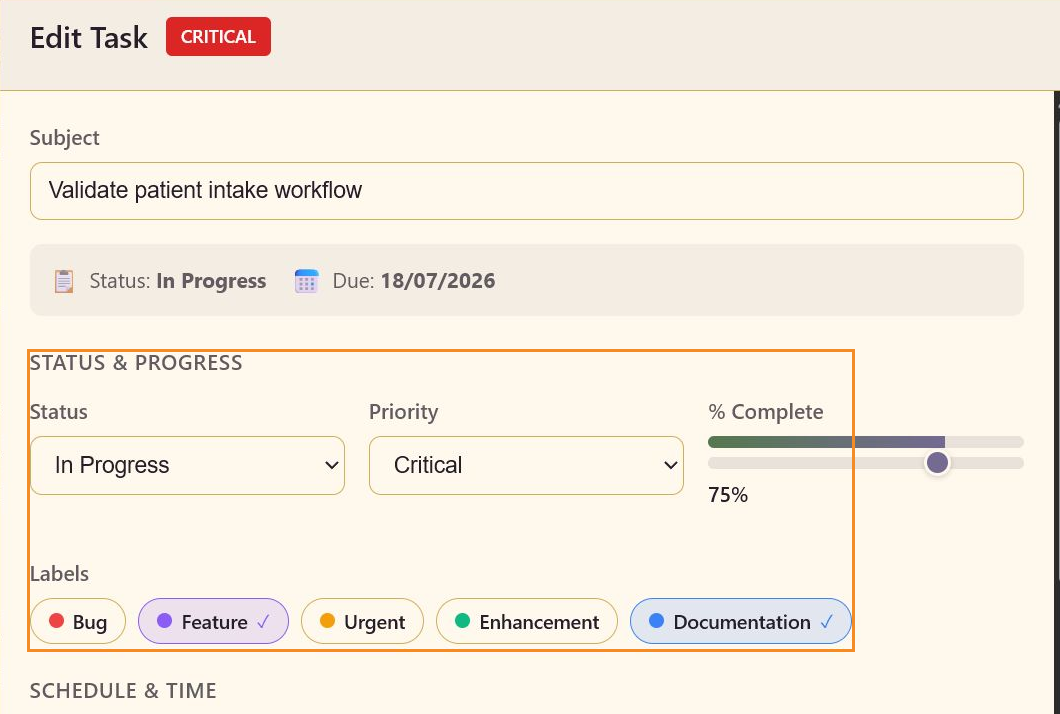
Section titled “2. Separate urgency from category”Use Priority for the consequence of delay: Critical, High, Medium, or Low. Use labels for the type of work: Bug, Feature, Urgent, Enhancement, or Documentation.
For CareArc, Build safety evaluation dashboard is Critical with Enhancement and Urgent labels. Approve FHIR integration mapping is High with a Feature label. The combination tells the team both how urgently to act and what kind of work it is.
3. Use progress to spot stalled work
Section titled “3. Use progress to spot stalled work”Compare progress with workflow state. A task at 75% in Backlog may need to be moved into In Progress. A task at 90% in Review may need a decision rather than more implementation. Do not change the percentage only to make a column look balanced; use the value that best reflects remaining effort.
4. Make the next move
Section titled “4. Make the next move”Open the task, change its Status when the handoff is real, and select Save. Use the column position and status together. The column shows where the work sits in the board flow, while the status field records the task’s current state in the editor and on the card.
Running the review from the board
Section titled “Running the review from the board”You can run the next operating review from the board itself, without a separate spreadsheet. Critical and High work stands out, labels let you filter by category, and progress points to the items that need a decision.