
Plan dates and progress
Give every task a due date and a completion percentage that the team can plan from. Do that across the CareArc board and it shows the next deadlines, with a realistic progress value on each active task.
1. Set a due date
Section titled “1. Set a due date”Open a task and scroll to Schedule & Time. Enter the due date, then update it whenever the real handoff date moves. The CareArc board uses dates such as 15/07/2026 for consent sign-off, 17/07/2026 for sandbox SSO, and 20/07/2026 for the safety dashboard.
2. Set completion percentage
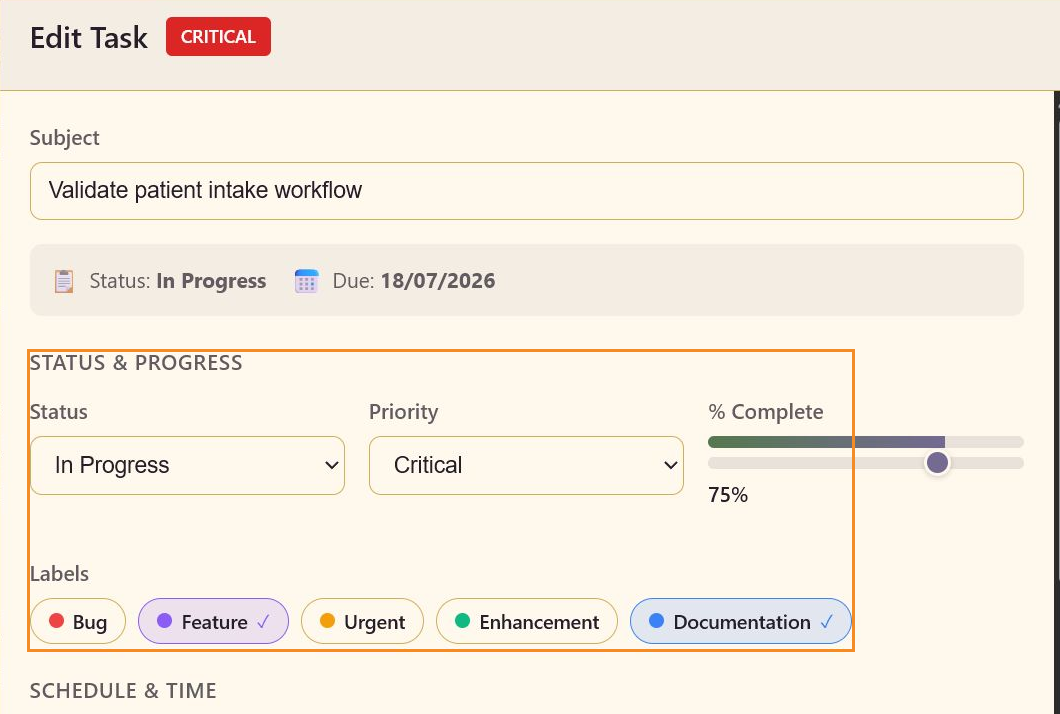
Section titled “2. Set completion percentage”Use the % Complete slider in Status & Progress. Set 0% for work that has not started, 50% for an active midpoint, and a higher value only when the remaining work is understood. Validate patient intake workflow is 75%; Build safety evaluation dashboard is 60%; Run clinician red-team scenarios is 40%.
3. Compare the card with the editor
Section titled “3. Compare the card with the editor”Save the task, then check the board card. The progress bar and percentage should match the task editor, while the date remains visible beside the priority and status signals.
4. Use Calendar when dates are the question
Section titled “4. Use Calendar when dates are the question”Switch to Calendar when the team needs to see when work falls due rather than which state it is in. Return to Board when the question is who owns the handoff between columns.
Dates and progress on the board
Section titled “Dates and progress on the board”You can now discuss dates without leaving the board: each card shows its deadline, and the editor holds the team’s current estimate of how much is complete.