The create dialog asks for three things.
| Field |
Required |
Default |
| Name |
Yes |
— |
| Description |
No |
— |
| Status |
No |
Draft |
Everything else is set afterwards in Project Settings.
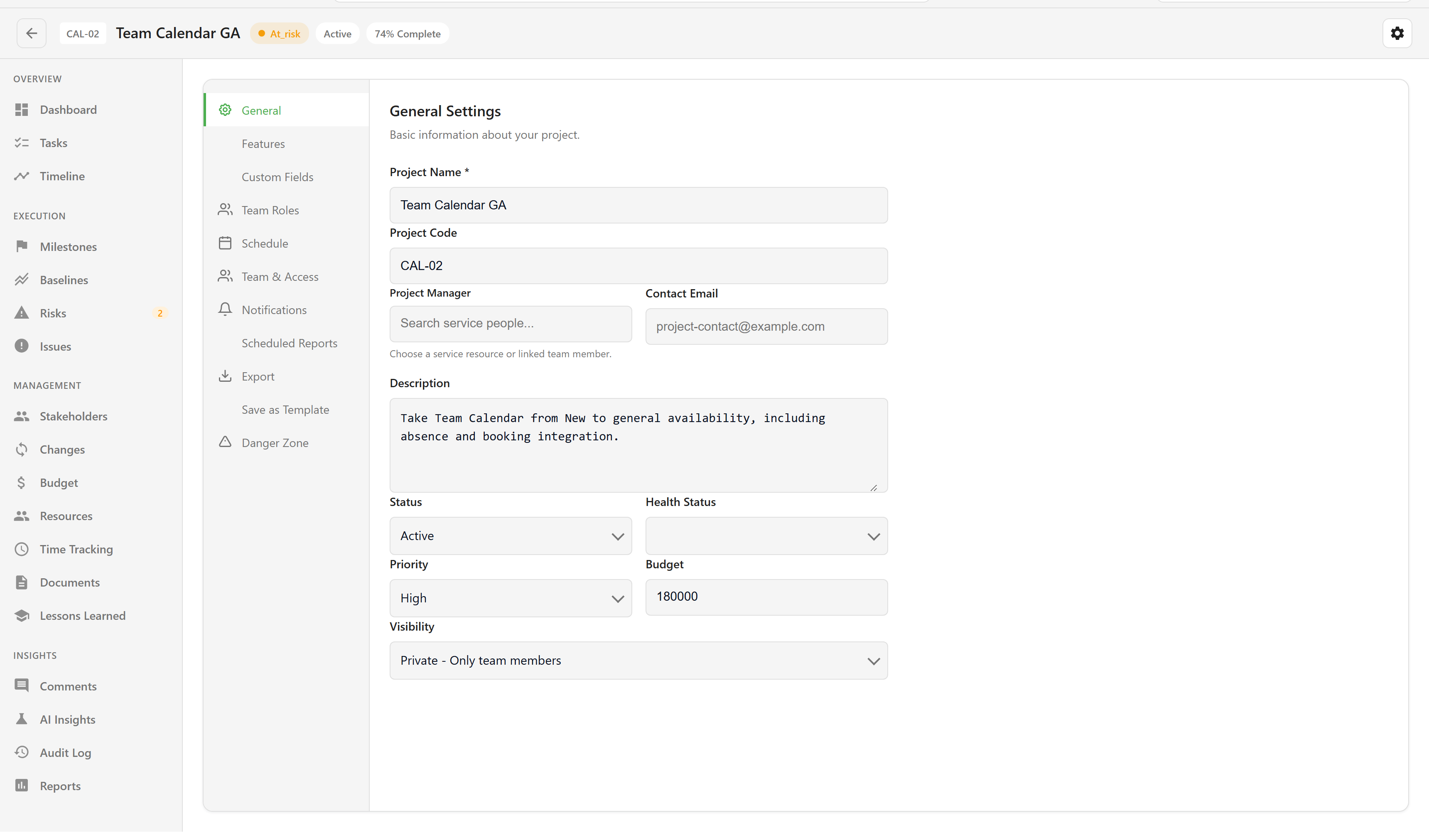
| Field |
Values |
Default |
| Project Name |
Required, up to 255 characters |
— |
| Project Code |
Up to 50 characters, such as PROJ-001 |
— |
| Project Manager |
A person from the service |
— |
| Contact Email |
An email address |
— |
| Description |
Up to 5,000 characters |
— |
| Status |
Draft, Planning, Active, On Hold, Completed, Cancelled |
Planning |
| Health Status |
On Track, At Risk, Critical |
On Track |
| Priority |
Low, Medium, High, Critical |
Medium |
| Budget |
A number |
0 |
| Visibility |
Private (team only), Internal (organisation), Public (anyone with the link) |
Private |
| Section |
Contents |
| Features |
Which sections appear. Dashboard, Tasks, Timeline, and Settings are always on; Earned Value, Workload, and Dependencies start off. |
| Custom Fields |
Service-wide field definitions for projects, milestones, risks, issues, and documents. |
| Team Roles |
The role list offered when allocating somebody. Defaults run from Project Manager to Stakeholder. |
| Schedule |
Start Date, Target End Date, Actual End Date, with a live duration summary. |
| Team & Access |
Team members with a role of Owner, Manager, Member, or Viewer. |
| Notifications |
Status Change, Task Assignment, Milestone Update, Risk Identified, Issue Reported, each testable. |
| Scheduled Reports |
Recurring report delivery. |
| Export |
Format and inclusion options. See the note at the end of this page. |
| Save as Template |
Template name, description, and category. |
| Danger Zone |
Archive. Permanent delete is not offered. |
| Field |
Values |
| Name |
Required |
| Description |
— |
| Status |
Pending, In Progress, Completed, Delayed, Cancelled |
| Due Date |
Required |
| Owner |
A person |
| Critical Path |
Checkbox |
| Field |
Values |
| Title |
Required |
| Description |
— |
| Category |
Technical, Schedule, Cost, Resource, External, Quality, Scope, Other |
| Probability |
Five-point scale |
| Impact |
Five-point scale |
| Risk Score |
Derived from probability and impact |
| Response Strategy |
Avoid, Mitigate, Transfer, Accept |
| Risk Owner |
A person |
| Mitigation Plan |
— |
| Contingency Plan |
— |
| Field |
Values |
| Title |
Required |
| Description |
— |
| Priority |
Low, Medium, High, Critical |
| Severity |
Minor, Moderate, Major, Severe |
| Status |
Open, In Progress, Resolved, Closed, Won’t Fix |
| Due Date |
— |
| Assigned To |
A person |
| Field |
Values |
| Name |
Required |
| Role, Organization, Email, Phone |
Free text |
| Influence Level |
Low, Medium, High |
| Interest Level |
Low, Medium, High |
| Engagement Strategy |
Manage Closely, Keep Satisfied, Keep Informed, Monitor |
| Requirements, Expectations |
Free text |
| Field |
Values |
| Description |
Required |
| Category |
Labor, Materials, Equipment, Travel, Software, Consulting, Overhead, Other |
| Amount |
Required |
| Date |
— |
| Status |
Spent (Actual), Committed, Forecast |
| Vendor/Source |
Free text |
| Notes |
Free text |
Project export does not work from any entry point — the card action, the list row, the bulk action, and the Import/Export dialog all fail. Bulk archive, bulk status change, bulk assign, and the CSV import template are affected by the same fault. Do not plan around these until they are fixed.
For what each section does with these fields, see the project views reference.
