
Recolor with Hue/Saturation
Hue/Saturation is a non-destructive way to recolor or rebalance artwork before you commit. You drag three sliders, watch the canvas update live, and apply only once the result looks right.
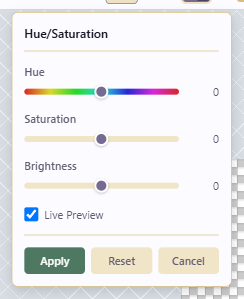
Open the dialog
Section titled “Open the dialog”Click Hue/Saturation Adjustment in the centre of the top toolbar. The dialog has three sliders, all starting at 0. Hue (−180 to +180) rotates all hues around the color wheel, Saturation (−100 to +100) desaturates toward gray when negative and intensifies when positive, and Brightness (−100 to +100) darkens or lightens.
Live Preview
Section titled “Live Preview”With Live Preview on, the canvas updates as you drag. Keep it on. Applying without previewing leads to repeated undos.
A common sequence starts with Hue: nudge it until the overall cast is correct, which for shifting a blue character toward purple takes roughly ±10. Then lower Saturation by 20 to 40 if the result is too saturated, and bump Brightness by +5 to +10 if it became muddy.
Apply, reset, or cancel
Section titled “Apply, reset, or cancel”Apply commits the change; it’s still undoable with Ctrl+Z afterward. Reset returns all sliders to 0 without closing the dialog, useful for trying another direction. Cancel discards and closes.
Use cases
Section titled “Use cases”Small hue shifts (±10) fix a whole-artwork color cast. Negative saturation builds a grim mood; a small positive saturation lifts a flat export. Larger hue shifts (±60 to ±120) repurpose an asset for a new theme.
Hue/Saturation is global, which is its main limit. To recolor just one material (only the cloth, say, leaving skin and metal alone) use something else. Select the cloth pixels by color with the Magic Wand and Fill them with the new color, or make it a Variation palette swap so the base art is untouched. For final palette adjustments, use the palette tools (Generate Ramp, Sort Palette) instead of a global brightness change.
Hue shifts can push colors outside a locked palette. If you’re enforcing a strict palette, unlock it for the adjustment, apply, then snap colors back to the nearest palette entry by hand.